
An Amazon FBA calculator helps sellers understand fees, costs, and profit before listing or buying a product. If you sell using Fulfilment by Amazon, understanding these numbers is essential.
Many sellers don't fail because they can't find products, they fail because they misunderstand fees. A product can look profitable at first glance and still lose money once Amazon's full cost structure is applied.
Calculate Profits Like A Pro
7 Day Free Trial
What is an Amazon FBA Calculator?
An Amazon FBA calculator estimates how much profit you'll make on a product after Amazon deducts its fees.
Most calculators help sellers estimate:
- Amazon referral fees
- FBA fulfilment fees
- Storage fees
- VAT (where applicable)
- Net profit and ROI
Sellers use these calculations before buying stock to avoid unprofitable products.
Why Amazon FBA Fees Matter (Especially For Online Arbitrage)
Online arbitrage, wholesale, and Amazon-to-Amazon sellers operate in fast-moving markets where prices and fees change constantly. Calculating fees manually or relying on outdated assumptions increases the risk of mistakes.
A reliable calculator removes guesswork, reduces human error, and allows sellers to focus on execution rather than repetitive validation. In arbitrage, avoiding bad buys is often more important than finding the next big winner.
Selling on Amazon using FBA simplifies fulfilment, but it is not free and fees change based on:
- Product size and weight
- Selling price
- Category
- Storage duration and season
For online arbitrage sellers, margins are often tight. A small difference in fees can turn a product that looks profitable into a loss.
This is where fee accuracy becomes critical before you commit capital or time.
Beginner Mistakes With Amazon FBA Fees
Many sellers underestimate how easy it is to miscalculate Amazon FBA fees.
Storage fees are often ignored entirely, especially by newer sellers who focus only on fulfilment and referral costs.
VAT and inbound delivery costs are also frequently forgotten, which can significantly distort profit calculations.
Another common issue is relying on outdated fee assumptions or old calculator data, particularly as Amazon regularly adjusts pricing structures.
Finally, sellers often fail to account for price drops, which can quickly turn a marginal deal into a loss.
Understanding how Amazon's fees work in practice is far more important than any single sourcing tactic.
How ArbiSource Handles FBA Fees During Sourcing
ArbiSource applies Amazon FBA fee logic at the sourcing stage, not after.
When sellers use ArbiSource, fee calculations can include:
- Amazon referral fees
- FBA fulfilment fees
- Closing fees (books & DVDs)
- UK & EU digital services fees
- Fixed Amazon costs
- Inbound shipping fees
- Estimated storage fees
Instead of manually checking each product with a standalone calculator, sellers can:
- Filter results by ROI and margin thresholds
- Remove unprofitable products automatically
- Avoid false positives caused by missing or underestimated fees
This approach is especially important for online arbitrage, where speed, accuracy, and volume determine profitability.
Core Amazon FBA Fees Explained
Referral fees
A percentage of the selling price, typically 8%–15%, depending on category.
Fulfilment fees
Charged per unit for picking, packing, shipping, customer service and returns handling. These depend on size tied and shipping weight.
For most sellers, this is the largest single cost.
Storage fees
These are monthly charges for storing inventory in Amazon warehouses. They can be higher during Q4 and long-term storage fees apply to slow-moving stock.
How Sellers Calculate FBA Profit
At its core, Amazon FBA profitability is calculated by subtracting all Amazon fees and operational costs from the selling price. What remains is net profit. From this, sellers derive ROI and margin to decide whether a product is worth sourcing.
All Amazon FBA calculators use this same underlying logic. The difference lies in how consistently and accurately the data is applied especially when evaluating many products at once.
Existing Amazon FBA Calculators Sellers Can Use
If you want to calculate Amazon fees manually, here are two commonly used tools:
ArbiSource Fee & Profit Calculations
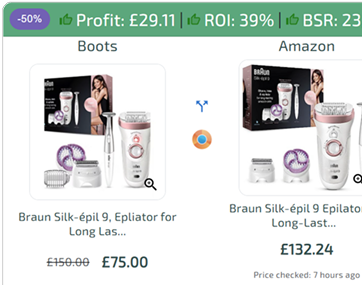
ArbiSource calculates Amazon fees, profit, and ROI automatically as part of the sourcing process, across large product sets rather than one ASIN at a time. This makes it easier to evaluate opportunities at scale and integrate fee calculations directly into Amazon online arbitrage.
Source Deals Like A Pro
7 Day Free Trial
Amazon FBA Revenue Calculator
Amazon's own calculator allows sellers to enter an ASIN, selling price, and costs to estimate fees and profit. It's useful for spot checks but limited to one product at a time.
SellerAmp (SAS)
SellerAmp includes an integrated FBA profit calculator that estimates Amazon fees, breakeven price, and margins for individual product checks.
SellerAmp also provides a Chrome extension that surfaces the calculator and key listing context directly on Amazon product pages.
FAQs
What does an Amazon FBA calculator do?
It estimates Amazon fees, costs, and profit for a product sold using FBA.
Are Amazon FBA fees fixed?
No. Fees vary by category, size, weight, region, and time of year.
Do I need a calculator to sell on Amazon?
You can calculate manually, but a calculator makes it faster and more accurate.
How does ArbiSource handle FBA profitability?
ArbiSource applies fee-aware filters during sourcing so sellers only see products that meet their profit targets.