
The best Amazon seller tools help you make faster decisions, avoid costly mistakes, and scale what works. Amazon selling is highly competitive, data-driven and manual processes quickly become a bottleneck.
There is a lot of tools out there to help you make better decisions. This guide breaks down the best Amazon seller tools by category and explains what each is used for.
Why Amazon Seller Tools Matter
Successful Amazon sellers rely on tools to operate efficiently and make informed decisions at scale.
These tools help identify profitable products, accurately calculate fees, margins, ROI, and avoid gated or restricted listings that can block sales.
They also allow sellers to track price movements, stock levels, and competitive activity, while automating repetitive tasks that would otherwise consume significant time.
Without the right tools, sellers are typically slower, less accurate and far less competitive in a fast-moving marketplace.
Core Categories of Amazon Seller Tools
Amazon Product Sourcing Tools (The Most Important Category)
Product sourcing tools are the foundation of any scalable Amazon business. They help sellers find profitable products faster by turning millions of listings, supplier catalogues, and price signals into clear "yes/no" opportunities.
But it's important to separate what "sourcing" means depending on your business model:
- Wholesale & private label sourcing is market-led. You're validating niches, brands, supplier catalogues, and long-term viability.
- Arbitrage sourcing is deal-led. You're finding price gaps to source deals.
At scale, sourcing tools are not optional. They're what allow you to move from manual browsing to consistent, repeatable product discovery.
What Amazon Product Sourcing Tools Do (In Any Model)
At their core, sourcing tools automate the most time-consuming parts of product selection:
- Turn Amazon (and supplier/retailer data) into structured product lists.
- Surface demand and competition signals so you can sanity-check viability.
- Estimate profitability (fees, ROI, margin) to filter out dead leads quickly.
- Reduce risk by flagging unstable pricing, poor history, or bad listing dynamics, and checking restrictions and Amazon gating status.
- Help you prioritise what to investigate next instead of starting from scratch every time.
The difference is where the data comes from and how quickly decisions need to be made.
Wholesale & Private Label Sourcing Software (Market-Led Tools)
Wholesale and private label sellers usually need tools that help answer: "Is this a good product to back?"
These tools are typically used for:
- Product and niche research (demand, saturation, review patterns)
- Keyword demand and discovery (to validate search intent)
- Competitor and category analysis (who dominates the market and why)
- Brand/supplier-level insights (especially useful when moving into wholesale relationships)
Common tools used by wholesale/private label sellers:
Helium 10: helium10.com
Jungle Scout: junglescout.com
SellerApp: sellerapp.com
SmartScout: smartscout.com
Note: These platforms often overlap with "all-in-one" suites because private label sellers usually need sourcing, keyword and listing workflows together.
Arbitrage Sourcing Software (Deal-Led Tools)
Arbitrage sellers need tools that help answer: "Is this profitable right now, and can I move fast?"
These tools are primarily used for:
- Online arbitrage (OA): scanning online retailers and validating against Amazon.
- Amazon-to-Amazon flips (A2A): exploiting temporary price drops on Amazon itself.
- Hybrid workflows: combining fast lead lists with deeper validation before buying.
Arbitrage tools focus on:
- Automated scanning at scale (more leads, less browsing)
- Fast profitability filtering (ROI, margin, fees)
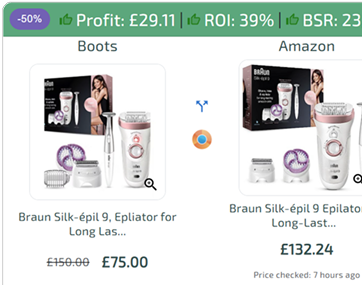
- Clean deal lists and clear "why this is profitable" signals
- Speed and repeatability (because the best deals don't sit around)
Common arbitrage sourcing tools:
- ArbiSource: arbisource.com
- Tactical Arbitrage: tacticalarbitrage.com
- SourceMogul: sourcemogul.com
For a comprehensive guide on finding products for online arbitrage, including methods, workflows, and beginner strategies, see our detailed guide.
Keepa Sits Under Everything (Validation, Not Just Sourcing)
One mistake sellers make is treating sourcing as "finding a product" instead of validating behaviour. This is where price and sales history tools matter, regardless of model.
Keepa is widely used across:
- Private label (to understand price stability and long-term behaviour)
- Wholesale (to time buys and avoid unstable listings)
- Arbitrage (to avoid traps and validate whether a dip is real or normal)
Choosing the Right Sourcing Tool
The best sourcing tool depends on how you source and how fast you want to move:
- Private label / brand builders: prioritise market research, keyword validation, and listing-driven workflows
- Wholesale sellers: prioritise catalogue analysis, brand/category insight, and repeatable buying decisions
- Arbitrage sellers: prioritise speed, automation, and clean deal lists that reduce decision time
Manual browsing does not scale, software does. Regardless of strategy, sourcing tools exist to solve the same problem: finding profitable products consistently, before everyone else does.
Best All-in-One Tools for Amazon Sellers
These are software platforms that bundle product research, keyword research, listing optimisation and analytics, and sometimes PPC/ad management into a single subscription.
They're popular with private-label and brand sellers who need end-to-end tools for launching and scaling listings rather than just sourcing deals.
Best-known options:
- Helium 10: helium10.com
- Jungle Scout: junglescout.com
- SellerApp: sellerapp.com
- Sellerise: sellerise.com
When to choose these:
If you want one subscription to cover most "research and optimisation" tasks, and you're building listings rather than purely sourcing deals.
Amazon Product Research & Market Analysis Tools
These tools analyse demand and competition on Amazon rather than sourcing products. Some all-in-one Amazon seller suites also include product research features, but standalone product research tools focus purely on market demand and competition rather than full listing and optimisation workflows.
Common Tools:
- Jungle Scout: junglescout.com
- Helium 10 (research features): helium10.com
- AMZScout: amzscout.net
- SmartScout (brand/category/seller research): smartscout.com
Best For:
- Private label
- Wholesale validation
- Market demand checks
Amazon Product Price & Sales History Tools
These tools show how a product's price and sales performance have changed over time on Amazon. By tracking historical pricing, sales rank trends, and seller or stock changes, they help sellers understand whether current conditions are normal or the result of short-term fluctuations.
They're widely used across all selling models as a sanity check before making a buying or sourcing decision.
Common Tools:
- Keepa: keepa.com
- CamelCamelCamel: camelcamelcamel.com
What They Show
- Price history
- Sales rank trends
- Stock and seller changes
Amazon Profit & Fee Calculation Tools
These tools help Amazon sellers understand the true profitability of a product by accounting for Amazon fees and operational costs that aren't always obvious at first glance. By factoring in referral fees, FBA fulfilment, storage, and other hidden costs, they reduce guesswork and prevent sellers from relying on incomplete margin estimates.
They're commonly used to validate profit before sourcing, pricing, or launching products.
Used For:
- Amazon referral fees
- FBA fulfilment fees
- Storage and hidden costs
ArbiSource includes fee-aware filtering during sourcing, reducing the need to calculate profitability product by product. For a detailed breakdown of how Amazon FBA calculators work and how fees impact profitability, see our comprehensive guide.
Extra Options:
Amazon Retail Arbitrage & Mobile Scanning Tools
These tools are designed for sellers who source products in physical stores or use hybrid sourcing workflows. By scanning barcodes in-store, they provide quick access to pricing, fees, restrictions, and sales data, helping sellers decide whether a product is worth buying on the spot.
They're essential for retail arbitrage and are also commonly used by online and wholesale sellers when validating products outside of a desktop setup.
Common Tools
- SellerAmp (SAS): selleramp.com
- Amazon Seller app: sell.amazon.com/tools/amazon-seller-app
How they're used:
- Scan barcodes in-store
- Validate fees, restrictions, and sales data
Note: ArbiSource integrates with SellerAmp, allowing sellers to reverse search ArbiSource data while sourcing in-store.
Amazon Repricing Tools
These tools automatically adjust product prices after listings are live to help sellers stay competitive in the Buy Box. By responding to competitor pricing, stock levels, and seller rules, they reduce the need for manual price changes and help maintain margins at scale.
They're used after sourcing and listing and are focused on price optimisation rather than product discovery.
Common Tools:
- BQool: bqool.com
- Seller Snap: sellersnap.io
- Repricer.com: repricer.com
Amazon PPC & Advertising Tools
These tools help Amazon sellers manage and optimise paid advertising once products are live. By automating bids, analysing performance data and adjusting campaigns based on conversion signals. They're designed to improve efficiency and return on ad spend (ROAS) at scale.
They're most relevant for sellers actively running Sponsored Ads and looking to reduce manual campaign management as spend increases.
Common Tools:
- Teikametrics: teikametrics.com
- Perpetua: perpetua.io
- SellerLabs: sellerlabs.com
Amazon Listing & Optimisation Tools
These tools focus on improving product visibility and conversion rates after a listing already exists. They're used to optimise titles, bullets, descriptions, images, and keywords so products rank better in search and convert more consistently.
They're commonly used by private label, brand, and wholesale sellers refining existing listings rather than sourcing new products.
Common Tools:
- Helium 10 (listing optimisation): helium10.com
- SellerApp: sellerapp.com
- MerchantWords (keyword research): merchantwords.com
Best Amazon Seller Tool Stack For Arbitrage (Beginner Friendly)
A simple, effective setup looks like this:
- ArbiSource – sourcing, filtering, restrictions, scaling
- Keepa – price and sales history validation (keepa.com)
- SellerAmp – mobile scanning for RA or hybrid sourcing (selleramp.com)
- Seller Central – listings, inventory, and account health
How to Think About Amazon Seller Tools as a System
Amazon seller tools are most effective when they're treated as a connected system rather than a collection of subscriptions.
At the foundation is sourcing — without a reliable way to find profitable products, everything else becomes reactive. From there, tools layer on validation, pricing insight, and operational efficiency. Advanced tools like repricers, PPC platforms, and listing optimisation software only matter once consistent sourcing and profitability are already in place.
Most sellers don't need every tool at once. Beginners benefit most from a small, focused stack that helps them:
- Find opportunities quickly
- Validate risk before buying
- Learn how Amazon pricing and fees really work
As experience grows, additional tools can be added to support scale, automation, and optimisation — not before.
The key is alignment. Choose tools that match your sourcing model, your speed requirements and your current stage as a seller. Software doesn't guarantee success, but the right tools remove friction, reduce mistakes, and dramatically shorten the learning curve.
For arbitrage-focused sellers, starting with a sourcing-first platform and building outward remains the most efficient path forward.
Source Deals Like A Pro
7 Day Free Trial
FAQs
What are the best Amazon seller tools for beginners?
Start with sourcing (ArbiSource), validation (Keepa), and basic scanning (SellerAmp / Amazon Seller App).
Do I need different tools for OA and RA?
OA relies more on desktop sourcing tools, while RA benefits from mobile scanning apps. Many sellers combine both.
Can tools guarantee success?
No, but they reduce mistakes and accelerate learning.