
If you want to become an Amazon seller, the first step is creating an Amazon Seller Central account.
This guide explains what an Amazon seller account is, how to create one step by step, what you need before signing up, how verification works and what to do once your account is live.
What is an Amazon Seller account?
An Amazon seller account, also known as a Seller Central account is the system Amazon uses to manage all third-party sellers on its marketplace.
Seller Central acts as the control centre for your Amazon business. It's where you create product listings, manage inventory, choose fulfilment methods, process orders, track payments and monitor account health.
If you sell on Amazon in any capacity, Seller Central is where everything happens.
Why you need an Amazon Seller account?
You cannot sell products on Amazon without an approved seller account. Amazon requires all sellers, whether individuals or registered businesses, to verify their identity and accept marketplace policies before listing products.
This applies regardless of how you plan to sell. Online arbitrage, wholesale and private label all require a Seller Central account.
The Different Types of Amazon Seller Accounts
Amazon offers two main account types, and choosing the right one depends on how seriously you plan to sell.
Individual Seller Accounts
Individual seller accounts are designed for people testing the platform or selling occasionally. There's no monthly subscription fee, but Amazon charges a fee for each item sold. These accounts also have limited features and monthly selling caps, which can become restrictive once you start selling consistently.
Professional Seller Accounts
Professional seller accounts are built for active sellers. They come with a monthly subscription but remove per-item selling fees and unlock key features such as Amazon advertising, advanced reports, API usage, and eligibility for restricted categories. If you plan to sell at scale or use online arbitrage tools like ArbiSource, a Professional account is required.
How much does it cost to become an Amazon seller?
Becoming an Amazon seller doesn't require a large upfront investment, but there are ongoing costs to understand.
Individual accounts avoid monthly fees but charge per item sold, while Professional accounts charge a subscription in exchange for better margins and more functionality. On top of this, all sellers pay category-based referral fees, and those using FBA also pay fulfilment and storage fees.
What Amazon Requires to Open a Seller Account
To become an Amazon Seller, you are required to give all of the necessary information to prove who you are and your legal business status, either a registered business or an individual seller.
Prepare these in advance before you sign up for a smooth onboarding process.
Personal Details:
- Valid government ID
- Proof of address, bank statement or bill
- Credit or debit card (for your subscription)
- Phone number
Business Details:
All of these are required if you are registering as a business, but not all are required if you are registering as an individual seller, see here for more detail.
- Business Location
- Business Type
- Business Name
- Company registration number
- Registered business address
How to create an Amazon Seller account (step-by-step)
Note: This process and verification times may differ depending on when and the region you are applying from, below is the standard UK/US process.
1) Go to Amazon Seller Central
Start the sign-up process from Amazon's Seller Central registration page.
For US: sell.amazon.com
For UK: sell.amazon.co.uk
2) Create or login to an existing Amazon account
You can either create a new account or login to an existing account. There will be a step for 2FA (2-factor authentication) to protect your account.
3) Enter personal or business details
Provide your name, address, and business information exactly as shown on your documents.
4) Enter primary contact person
Using your details from the previous step, enter your primary contact person (you).
5) Payment method
This is the card your subscription will be billed to.
6) Amazon store name
This has to be unique but can be changed later.
7) Verify your identity
This is your identity documents, like a passport or driving license and proof of address.
7) Video Call with Amazon
Schedule a video call with Amazon to verify your identity and the information you provided.
8) Wait for approval
Once approved, you'll gain full access to your Seller Central dashboard.
What Happens After Your Seller Account is Approved?
Once your account is live, you'll have full access to Seller Central, but selling doesn't automatically become easy.
Your next steps are deciding whether to use FBA or fulfil orders yourself, understanding category restrictions and fees, and listing your first products.
Category Restrictions & Gated Products
New Amazon seller accounts are restricted by default. This means you may see messages saying you're not approved to sell certain products or categories, even though your account is active.
This is normal and affects most beginners. Some categories and brands require additional approval, and understanding this early helps you avoid sourcing products you can't list.
Learn more about gated products and category restrictions on Amazon.
How ArbiSource Fits In
Once your seller account is active, tools like ArbiSource help bridge the gap between having an account and making it profitable.
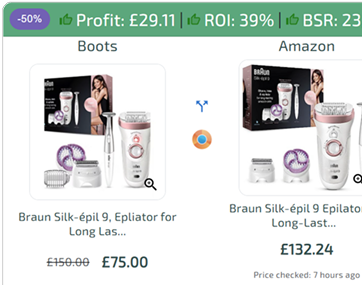
ArbiSource helps sellers identify products they can actually sell, spot restrictions before buying, calculate fees and profit in advance and scale sourcing using data rather than guesswork.
Your seller account is the foundation, but sourcing decisions determine whether the business works.
Source Deals Like A Pro
7 Day Free Trial
FAQs
How long does it take to create an Amazon seller account?
Approval can take anywhere from a few hours to several days, depending on verification.
Do I need a business to sell on Amazon?
No. You can start as an individual and register a business later if needed.
Can I change account types later?
Yes. You can upgrade from an Individual to a Professional account at any time.
Is creating an Amazon seller account free?
Individual accounts have no monthly fee. Professional accounts charge a subscription.
Can anyone become an Amazon seller?
Yes, as long as you can verify your identity and meet Amazon's requirements. Some categories require approval, but most people can get started without issue.