
Finding products for online arbitrage is the process of sourcing items from online retailers and selling them on Amazon for a profit. The challenge isn't "can I find items?" it's finding the right items quickly, consistently and before others.
This beginner guide covers the what, why, and how, plus the tools and repeatable methods you can use to start finding profitable opportunities.
For beginners, the biggest mistake is expecting results from randomly checking a few products. Learning how to find products for online arbitrage is a skill that improves with systems and repetition. Most new sellers take a few weeks to understand profitability rules and validation, then a few months to build consistent sourcing habits. The goal isn't to find one lucky deal, it's to build a process that surfaces opportunities daily. Understanding this skill is an important part of making money on Amazon.
What is Amazon Online Arbitrage?
Quick note before we move on incase you don't know what OA is. Amazon Online Arbitrage is buying products online (often from retailers, sales, or clearance) and reselling them on Amazon (commonly via FBA). Your profit comes from the difference between your buy price and your Amazon sale price, minus fees, delivery, and any prep costs. To understand how online arbitrage compares to other models, see our guides on online arbitrage vs wholesale and online arbitrage vs retail arbitrage.
Why Product Sourcing is The Real Skill
In the beginning you can lose time in three areas:
- Searching too slowly (manual browsing doesn't scale)
- Chasing stale leads (out of stock, price changed, or tanked on Amazon)
- Misreading profitability (fees, VAT, delivery, and competition)
A strong sourcing system solves these problems by combining fast discovery, accurate calculations, and repeatable scanning.
Every successful online arbitrage seller follows the same core process, regardless of experience level or tools used. The difference is how fast they can move through each step and how many products they can evaluate without burning time.
The Simplest Way to Find Products for Online Arbitrage
Here's the basic workflow you'll use over and over:
- Choose a starting point (retailer, category, sale, or ASIN)
- Generate a list of candidates (hundreds/thousands, not 10)
- Filter to profitability (ROI, margin, sales rank, price history, competition)
- Validate quickly (stock, variations, restrictions, fees, delivery)
- Buy small, then scale winners (replenishables + restock alerts)
The methods below all support the same sourcing workflow. Some help you discover deals faster, others help you focus on proven demand, and some are designed to help you scale without starting from zero each time. You don't need to use everything at once — most sellers combine a few methods that fit their stage.
Methods to Find Profitable Products with ArbiSource
Fast Discovery Methods
The Vault
Best for: beginners who want ready-to-go results without waiting.
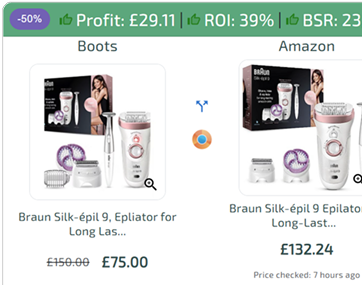
The Vault gives you pre-scraped/cached results across retailers and Amazon categories, surfacing products that can potentially be flipped profitably on Amazon. Because results are available instantly, it's ideal for quick daily sourcing sessions.
Key advantage: Apply a discount % and instantly re-calculate profitability across results, useful when you have a code, student discount, staff discount, newsletter offer, or seasonal promotion.
How to use it
- Pick a retailer, Amazon category or search by keyword
- Sort/filter by margin/ROI
- Apply your discount % to reveal extra profit opportunities others miss
Price Drops
Best for: finding new leads daily.
Price Drops is a live feed of products across retailers reduced by 25%+, helping you jump on profitable leads before stock disappears. ArbiSource monitors clearance/sale sections at scale and scans as soon as reductions occur.
How to use it
- Check the feed daily (or multiple times a day)
- Filter hard (margin/ROI rules) to avoid noise
- Move quickly on high-confidence leads
Fresh Data & Focused Sourcing
Store Scans
Best for: when you want the latest prices and stock.
Store Scans re-scrape retailers from The Vault so you can pull fresher data for specific stores/categories you care about.
How to use it
- Re-scan the same retailer categories you source most
- Prioritise retailers that just launched a sale, clearance, or promo
Category Scans
Best for: sellers who want to focus on what sells on Amazon.
Instead of starting at a retailer, Category Scans start with the Amazon category you're interested in and work backwards into sourcing.
How to use it
- Pick a category you understand (or want to build around)
- Scan and filter to items that match your buy-price targets and rules
Sourcing From Proven Demand
Reverse Search
Best for: when you already know what sells.
Reverse Search lets you start with an ASIN and have ArbiSource show you where you can source it from.
Sellers can also use this to analyse competitor storefronts, often called storefront stalking, or to reverse search STK (SellerToolKit) reports.
Why this matters: instead of hunting for new ideas every day, you focus on proven demand and simply find supply.
Amazon-to-Amazon opportunities (A2As)
Best for: Quick passive flips.
ArbiSource operates some of the fastest and most effective Amazon-to-Amazon (A2A) bots available, consistently surfacing profitable flips before Keepa and other tracking tools, with a clear focus on fast-moving products and real-time Discord alerts that let sellers act instantly
Learn more about Amazon-to-Amazon flips and how ArbiSource can help you find them.
Scaling & Reducing Competition
Wholesale Scans
Best for: scaling beyond public retail.
Wholesale can offer steadier availability and pricing. Wholesale Scans help you turn supplier lists/catalogues into structured, filterable opportunities.
How to use it
- Scan wholesale/catalogue-style sources
- Filter like you would for retail (fees, margin, ROI, competition)
Custom Scans
Best for: finding "your own" leads.
Custom Scans let you scan retailers not already on ArbiSource and keep the results to yourself—helping you avoid saturated leads.
You can use the Chrome extension to set up point-and-click scans (or near zero setup on many built-in/Shopify sites). It can also work on sites behind logins (useful for wholesale sites without spreadsheets).
Why it's powerful: you can scale manual "deep browsing" into a fast, repeatable scan without sharing the results.
Avoid starting from scratch: Replenishables
One of the biggest hidden time drains in online arbitrage is restarting your sourcing from zero every week. Replenishables are designed to prevent that. Instead of constantly hunting for new ideas, you focus on products that have already proven profitable and restock them when inventory runs low.
Best for: building consistent restocks.
Replenishables notify you when stock for an item falls below your chosen level, then show available sources ArbiSource has found.
Outcome: less time sourcing from scratch, more time repeating what works.
Tools & Software Beginners Typically Use
To source properly, most sellers rely on:
- Sourcing software (to generate and filter large product lists)
- Amazon fee/profit calculations (to avoid false positives)
- Price/stock validation (to reduce wasted buys)
- Tracking + alerts (to restock winners and catch drops)
ArbiSource bundles the sourcing workflows (Vault, scans, reverse sourcing, private scans, replenishable alerts, and deal feeds) so you spend less time searching and more time executing.
Beginner Checklist for Choosing Good Products
Use this quick checklist before you buy:
- Can I make profit after all fees and delivery?
- Is demand strong enough (not just a high price)?
- Is the listing stable (no sudden price crashes)?
- Is competition reasonable (not 50 sellers racing to the bottom)?
- Can I reliably source again (or is it a one-off)?
- Are there any restrictions or gating issues? (See our guide on getting ungated on Amazon for more information)
If you can't answer these quickly, you need better filtering and a tighter workflow.
What to Focus on Next:
Once you understand the process of finding products for online arbitrage, the next step is execution. That means scanning larger product sets, filtering aggressively, and spending less time validating dead ends.
Tools like ArbiSource are designed to support this workflow by handling discovery, filtering, and repeatability in one place, so you can focus on decisions rather than manual searching.
If you're just starting, begin with fast discovery methods and a small budget, then layer in proven-demand sourcing and replenishables as your confidence grows.
Source Deals Like A Pro
7 Day Free Trial
FAQs
How long does it take to find your first profitable product?
Most beginners find their first profitable product within a few weeks once they understand fees, filtering, and validation. Consistency usually improves after analysing hundreds or thousands of products rather than a handful.
How do I find products for online arbitrage fast?
Use a system that generates large product lists, then filter aggressively. The Vault and Price Drops are designed for fast discovery, while Store Scans keep data fresh.
Should I start with retailers or Amazon categories?
Retailers are simpler for beginners; categories are better once you understand what sells and want to build consistency. ArbiSource supports both via Store Scans and Category Scans.
What's the best way to reduce competition?
Find leads other people aren't seeing. Custom Scans help by scanning retailers outside shared databases and keeping results private.
How do I stop sourcing from scratch every week?
Build replenishables. Reverse Search helps you find sources for proven ASINs, and Replenishables helps you maintain stock levels automatically.